AI Automation Services
The work your team does by hand, done automatically. We build two kinds of AI automation. Workflows move invoices, orders and data between your systems. AI agents answer customers and calls, and follow up leads. It starts with a free audit.
Clients93 projects · 38+ clients





AI automation in two forms: workflows and agents
A workflow does one job the same way every time. An agent handles a conversation and decides the next step. Most companies need both, and both work inside the systems you already use.
Workflow automation
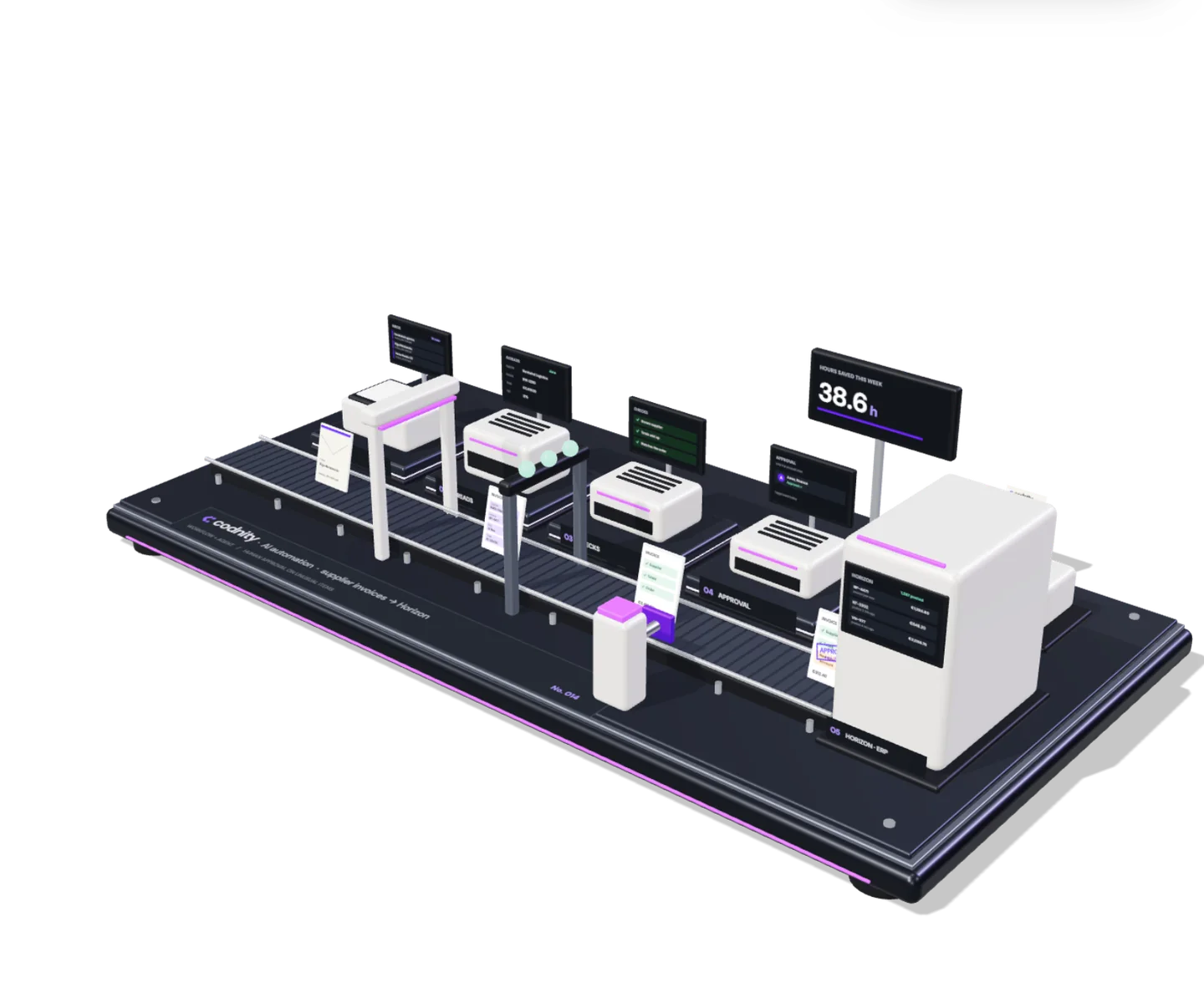
For work that follows the same steps every day. An invoice arrives, AI reads it, rules check it and it is posted. A person sees only the unusual ones.
- Invoices, waybills and orders
- Data entry between systems
- Reports and payment reminders
Built in  n8n,
n8n,  Make,
Make,  Zapier,
  Power Automate or code. See one simple workflow, step by step
AI agents
For work that is a conversation. An agent answers customers, calls, leads and questions about your data, works in your systems and decides the next step. It hands over to a person when it is not sure, or when the customer asks.
-
Customer service agent
Answers customer questions from your own knowledge: the help center, product data, policies and orders.
- Works in
- Zendesk, Intercom, WhatsApp and email
- Speaks
- LV · LT · EE · EN · RU
- Hands over
- Refunds, complaints and anything it is not sure about
- Shift
- 24/7
-
Voice agent
Answers and makes phone calls, books meetings into your calendar and updates the CRM.
- Works in
- your phone line, HubSpot, Salesforce and Google Calendar
- Speaks
- LV · EN · RU
- Hands over
- When the caller asks for a person
- Shift
- 24/7, inbound and outbound
-
Sales follow-up agent
Answers new leads within a minute, follows up quiet deals and books meetings for your sales team.
- Works in
- HubSpot, Salesforce, Clay and Calendly
- Speaks
- LV · LT · EE · EN
- Hands over
- When a lead is ready to talk to a person
- Shift
- Every new lead, any hour
-
Document agent
Reads invoices, waybills, contracts and orders, enters them in your systems and asks when a detail is missing.
- Works in
- Outlook, SharePoint, Horizon and Business Central
- Reads
- LV · LT · EE · EN · RU
- Hands over
- Unusual items, for approval
- Shift
- Every new document
-
Data analytics agent
Answers questions about your business data in plain language, with the numbers and the source behind each answer.
- Works in
- your data warehouse, Power BI, Excel, Meta and Google Ads
- Speaks
- LV · EN
- Shows
- The source behind every number
- Shift
- Any time you ask


AI automation for every team
Anything your team does by hand, the same way every day, can usually be automated. These are the jobs we automate most often, with workflows or agents. Open a folder to see them.
-
 Supplier invoicesRead, checked, posted
 Bank matchingPayments to invoices
 Expense receiptsPhoto to expense claim
 Payment remindersOverdue invoices chased
Finance and accounting
4 automationsInvoice processing automation: supplier invoices, receipts and bank lines go into your accounting system without retyping, matched to the bank.
-
 Waybills and CMRsMatched to deliveries
 Orders from emailPDF orders into the ERP
 Purchase ordersDrafted when stock is low
 Delivery updatesStatus sent to customers
Operations and logistics
4 automationsWaybills, CMRs, delivery notes and emailed orders are read and entered into the ERP, with stock and deliveries kept up to date.
-
 Inbound leadsAnswered and qualified
 OutreachResearched, personal, followed up
 Appointment settingMeetings booked for you
 CRM updatesNotes after every call
Sales and lead follow-up
4 automationsInbound leads answered within a minute, outreach researched in Clay or Apollo that follows up on its own, and meetings booked into the calendar.
-
 Email and chat repliesDrafted, a person sends
 Order questionsAnswered with tracking
 Ticket routingTo the right person
 Phone and WhatsAppVoice agent, 24/7
Customer support
4 automationsCommon questions answered from your knowledge, tickets sent to the right person, and calls handled by our voice agent.
-
 Campaign reportsEvery Monday, ready
 Content draftsFrom your product data
 Lead scoringWho to call first
 Review repliesDrafted for each review
Marketing
4 automationsCampaign reports that build themselves, product texts and posts drafted from your data, and new reviews answered on time.
-
 Data entryNo more copy and paste
 Document checksMissing details flagged
 Weekly reportsBuilt and sentSee the data analytics agent
 Answers from dataAsk in plain language
Data entry and reporting
4 automationsCopying between systems stops, documents are checked for missing details, and reports come from the data analytics agent.


Not sure where to start? The free audit shows which tasks cost your team the most hours.
How a simple AI automation handles one invoice
This is one of the simplest automations we build. A workflow is a trigger, a few steps and a check: AI reads the document, rules check it, and a person approves anything unusual. Most automations have more steps and more systems.

- It arrivesAn invoice lands in the finance inbox.
- AI reads itSupplier, lines, VAT and total, in any of your languages.
- Rules check itKnown supplier, totals and the order, checked without AI.
- A person approves the unusual onesThe rest are posted on their own, and every run is logged.
Start with a free AI automation audit
We spend a day with your team and watch how the work gets done. We do it in Riga, fly out to your office, or run it on a call. You get every manual task, its hours, and whether it needs a workflow or an agent.
- A day with your teamIn Riga, at your office or on a call. We sit with the people doing the work and time each manual task.
- A ranked listEvery task with its hours, what to automate first and what each automation costs.
- The first automationWe build the one that saves the most hours, measure it, then do the next.
| Manual task | Team | Hours a week | Plan |
|---|---|---|---|
| Retyping supplier invoices | Finance | 14 h | Workflow, first |
| Copying email orders into the ERP | Operations | 9 h | Workflow |
| "Where is my order?" emails | Support | 6 h | Agent |
| Replying to website leads | Sales | 4 h | Agent |
| Weekly sales report in Excel | Sales | 3 h | Data analytics agent |
| Chasing overdue invoices | Finance | 2 h | Workflow |
| Contract review | Management | 2 h | Keep with a person |
AI automation services FAQ
Short answers to what buyers ask before automating. Ask Cody for anything else.
What are AI automation services?
AI automation services take repetitive work off your team in two ways. Workflows run the same steps every time, such as posting supplier invoices into your ERP. AI agents handle conversations, such as customer questions, phone calls and new leads, and hand over to a person when needed.
What can AI automate in a business?
Work that follows the same steps every day, such as reading invoices, entering data and building weekly reports, becomes a workflow. Work that is a conversation, such as answering customers, calls and new leads, goes to an AI agent. The audit shows which of these take your team the most hours.
What is the difference between a workflow and an AI agent?
A workflow does one job the same way every time: an invoice arrives, AI reads it, rules check it and it is posted. An agent handles a conversation or a task with more than one possible next step: it answers, asks, books a meeting or hands over to a person. Many automations use both.
What can an AI agent do for our team?
An AI agent answers customers from your own knowledge, takes and makes phone calls, follows up new leads and reads incoming documents. It works inside your helpdesk, CRM and email, decides the next step and hands over to a person when it is not sure or when the customer asks.
Can an AI agent answer our phone calls?
Yes. Our voice agent answers and makes calls in your customers' language, books meetings into your calendar and updates the CRM. When the caller asks for a person, it hands the call over.
Can AI answer questions about our business data?
Yes. Our data analytics agent answers questions about your company's data in plain language, with the numbers and the source behind each answer. It works on a data warehouse we set up and run for you. See the data analytics agent.
What if the AI makes a mistake?
Every automation has checks: rules verify totals and supplier details, and anything unusual goes to a person for approval. Agents hand over to a person when they are not sure. Every step is logged, so you can see what happened.
Which systems can you connect?
Most systems with an API, plus email, PDFs and spreadsheets, and older systems through file exports. We often work with Horizon, Jumis, Moneo, Business Central, HubSpot, Pipedrive, Shopify and Microsoft 365. Your team keeps working in the same tools.
Do you build automations in n8n, Make or Zapier?
Yes. We use n8n when the data has to stay on your own servers, Make or Zapier when your team wants to see and change the flows, Power Automate in Microsoft 365 companies, and custom code for high volumes or complex rules. You own the flows either way.
What is included in the free automation audit?
A day with your team: on site in Riga, at your office (we fly out to you) or on a call. We list every manual task with the hours it takes, rank the tasks by time saved and send you the list with a price for each automation. You decide what to build.
How long does it take to automate a process?
Days for a simple workflow, a few weeks for most, including tests on your own documents. The first automation goes live before we start the next one.
How much does AI automation cost?
It depends on the volume and the systems involved. After the audit, each workflow or agent gets a fixed price and a monthly running cost, so you can compare it with the hours it saves.
Can AI read Latvian, Lithuanian and Estonian documents?
Yes. Current AI models read invoices, waybills and emails in Latvian, Lithuanian, Estonian, Russian and English. We test every automation on your own documents before it goes live.
Is our data safe with AI automation?
Each automation gets only the access it needs, and every step is logged. We document which AI provider processes what and where. Under the commercial terms we use, your data is not used to train AI models.
How is AI automation different from AI software development?
AI automation takes manual work off your team with workflows and agents inside the systems you already use. AI software development builds something new: a product you sell, a portal or an internal tool. See AI software development.
Book your free automation audit
Tell us which team loses the most time to manual work. We reply within one working day to plan the audit day: in Riga, at your office or on a call.
What comes next
Automation takes the manual work off your team. Software builds what is missing, and the data shows what it changed.
Insights
What we learn building AI systems, reports, secure software and stores, written down.
All insights